Leave,
in order.
Staff ask for leave from their phones, managers approve from wherever they are, and payroll gets one file at month end. For businesses with up to 50 people, from R199 a month, with leave rules you set.
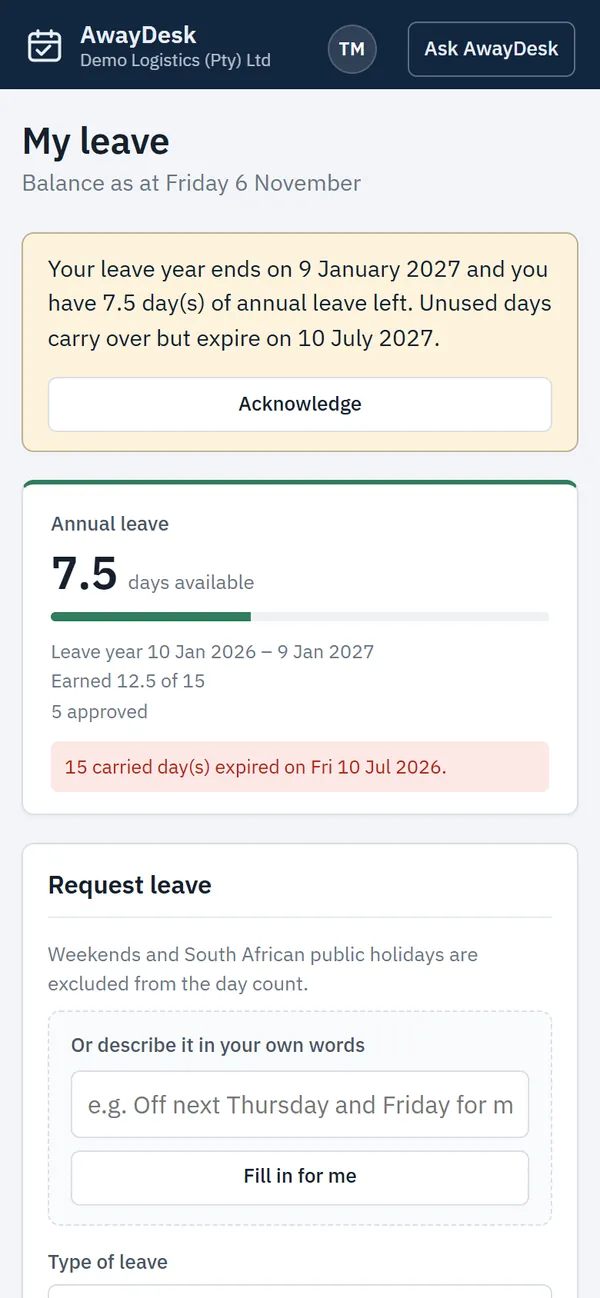
On their phones.
This is the app your people use, on any phone, with nothing to install. Real screens, with example data.
Their balanceWhat they have left, how it was earned, and every request. 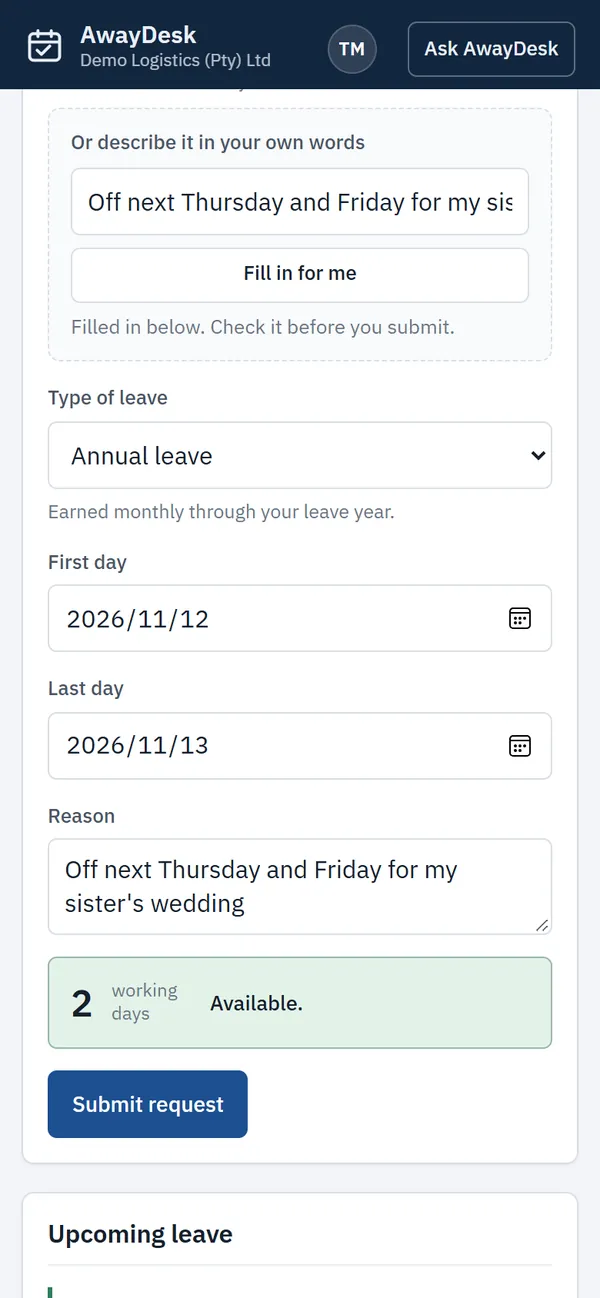
AskingTwo taps, or one sentence with the AI on Standard. The days are checked before it is sent. 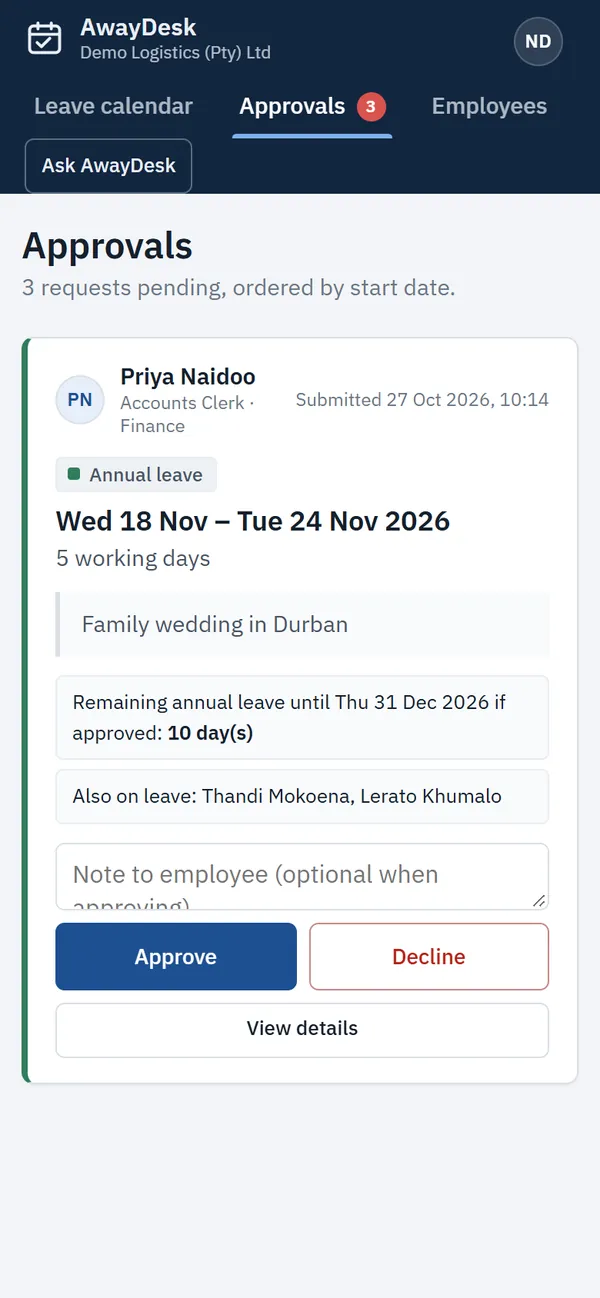
ApprovingFrom anywhere, with the balance and who else is away on the same card. 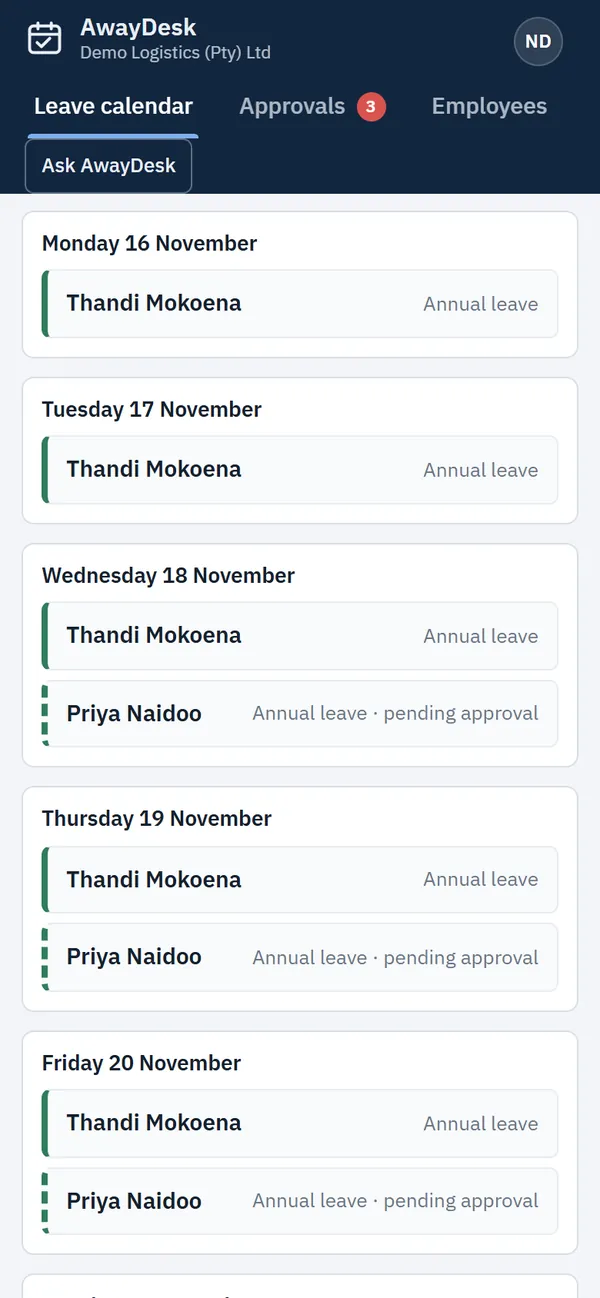
Who is awayEach day at a glance, with pending requests marked.
Asked for.
Employees ask from their phone, in days or in hours. Two hours of an eight-hour day comes off as a quarter day, and every request carries a reason.
- Any device
- Phone, tablet or computer, with nothing to install
- Sign in
- Company code and username, so staff need no email address
- Floor staff
- A leave capturer logs leave on their behalf
- Doctor's notes
- A photo of the note, attached to the request and kept private
- Balances
- Shown to employees for the types you allow
Approved.
Approve from your phone, wherever you are. Each request shows what the employee has left and who else is away on those days. Managers decide for their own team, and while a manager is on leave their stand-in decides for them. Every decision stays on record, and on Monday mornings you get the week's leave by email.
Your rules.
Leave types, days and how they build up are settings you change, so AwayDesk fits the way your business already works. It starts from the South African minimums and stops there only if you want it to.
- Leave types
- As many as you need, each with its own colour and note
- Days
- Per type, and different for any employee
- How days build up
- Earned monthly, or all at the start of the leave year
- Carry over
- On or off, with a limit and an expiry date
- Doctor's notes
- Required for the types you choose
- Public holidays
- South Africa's built in, plus any days you add
Month end.
At the end of the month, download the approved leave as Excel or CSV, matched on your employee numbers and carrying your payroll codes, and hand it to payroll. Leave that runs into the next month is split, so only the days in the month are counted. Included in Standard.
Closed.
Closing over the year end? Enter the dates once and AwayDesk books the working days as leave for everyone, or for the departments that close. Public holidays and days already booked are skipped. Included in Standard.
- Before saving
- See each person's days, and who would go below zero
- Leave years
- Split correctly when the closure crosses into January
- Undo
- Puts every day back in one step
What you get
In both plans
- Leave requests from any phone
- Approvals from anywhere, with notes
- Leave in days or hours
- Balances that update themselves
- Team leave calendar
- South African public holidays built in
- Your own leave types and rules
- Different terms for any employee
- Carry over and expiry, with reminders
- Leave brought from before, kept safe
- Doctor's notes, kept private
- Leave capturers for floor staff
- Calendar access for team leaders
- Monday email of who is away
- Your people loaded from Excel
- A full record of every change
Standard adds
- Up to 50 employees
- Managers who approve their own team
- Stand-ins while a manager is away
- Month-end file for payroll
- Sick leave and leave usage reports
- Year-end shutdowns in one step
- AI: leave requests typed in your own words
- AI: Ask AwayDesk, answers about your leave
- AI: a monthly summary in plain words
On any phone, and kept safe.
AwayDesk opens on any phone, tablet or computer, so there is nothing to install or update. Staff can add it to their home screen like an app, and managers can approve leave from wherever they are.
Your records are hosted in a secure environment and encrypted, both on the way to your screen and where they are stored. Each business's information is kept apart, people see only what you allow, doctor's notes are private, and every change is recorded.
Two plans.
One price for the whole team, with no charge per employee.
Starter, up to 10 employees
R1 990 a year
R166 a month, two months less than paying monthly.
For small teams where the owner or office manager approves all leave.
Choose StarterStandard, up to 50 employees
R5 000 a year
R417 a month, two months less than paying monthly.
Adds managers and stand-ins, the month-end payroll file, reports, year-end shutdowns and the AI assistant.
Choose StandardMore than 50 people
Tell us how many people you have and how your leave works, and we will put a plan together.
Talk to usWe set up your business with you, including your people and their leave balances from a spreadsheet, and arrange payment.
Guides
All guides- Annual leave in South Africa: how it builds up 21 consecutive days, 15 working days, 1.25 days a month and the six-month rule.
- Sick leave and the 36-month cycle How many days, the first six months, and when you may ask for a medical certificate.
- Month-end leave for payroll: a routine that works What payroll needs from you, and how to stop chasing it on the last day.
- Year-end shutdowns and annual leave Counting the days, public holidays, and new starters without enough leave.
Questions
Can we use our own leave rules?
Yes. Leave types, days per year, how days are earned, carry over and expiry are all settings, and any employee can have their own terms. The starting types follow the South African minimums; you can change or replace any of them.
Can we use it on our phones?
Yes. AwayDesk works on any phone, tablet or computer with nothing to install. Staff request leave and check their balance from their phone, and managers approve from wherever they are. You can add it to your home screen so it opens like an app.
Can managers approve their own team's leave?
On Standard, yes. You choose who approves each person's leave. When a manager is on leave, the stand-in they choose approves for them. Administrators can always approve as well. On Starter, the administrators approve all leave.
What is the difference between Starter and Standard?
Starter covers up to 10 employees and has everything for asking for, approving and tracking leave. Standard covers up to 50 and adds managers with stand-ins, the month-end file for payroll, sick leave and usage reports, and year-end shutdowns. You can move from Starter to Standard at any time.
What does the AI do?
The AI assistant comes with Standard. Staff can type a request in their own words, such as "off next Thursday and Friday for my sister's wedding", and AwayDesk fills in the form for them to check. Anyone can ask questions about their leave and get an answer from their own balances and your rules. Administrators also get a summary of each month in plain words. The AI never approves or changes anything.
Does it work with Sage VIP?
AwayDesk gives you a month-end leave file in Excel or CSV, with your payroll code on each leave type and employees matched by employee number. Send us a sample of your VIP leave import and we will set the file up to match it.
What happens when we grow?
Starter covers up to 10 active employees and Standard up to 50. People who have left can be deactivated so they stop counting. When you outgrow a plan, we move you to the next one, and if you need more than 50, talk to us about a larger plan.
Do employees need an email address?
No. They sign in with your company code, a username and a password. If they have an email address, you can send them a link to choose their own password.
What about leave people have already built up?
Import it with your employees from our Excel template. Days brought over can be marked as protected prior leave: they never expire and are used only after the current year's leave.
Is our information safe?
Your records are hosted in a secure environment and encrypted on the way to your screen and where they are stored. Each business's information is kept apart from every other business's. Employees see only their own leave, managers see their own team, and doctor's notes are private. The privacy policy sets out how information is handled.
Begin.
Choose a plan, or ask for a demo using your own leave rules, and we will be in touch.
Get startedGet started
Thank you.
We have your request and will contact you to arrange the next step.